
The Parivahan Sewa is an online service of the Ministry of Road Transport and Highways (MoRTH), Government of India. This portal provides indian citizens with access to almost all vehicle and driving license-related services digitally. Many RTO-related tasks can be easily completed through this online platform, eliminating the need for frequent visits to the Regional Transport Offices (RTOs). The purpose of this portal is to digitalize and provide flexible transport-related services.
License and Registration Details
Know Your Vehicle Details

Know Your Driving License Details
Check the status and details of driving license by license number.
- Vahan: This is a Vehicle Management System that handles all vehicle-related functions at the RTO in an online and centralised manner, including vehicle registration, ownership transfer, NOC issuance, fitness certificate issuance, and more.
- Sarathi: This is a Driving License Management System that handles all RTO-related licensing functions in a digital and centralised manner. It allows users to apply for Learner’s Licenses (LL), obtain Permanent Driving Licenses (DL), renew DLs and more, all through an online portal.
License Related Services
Access a wide range of driving licence services online, including new or renewal of driving licence, learner’s licence application, slot booking, duplicate licence, application status check, and online learner’s licence test.






Vehicle Related Services
Manage vehicle registration online: book appointments, check status, request replacements, update address, transfer ownership, and view loan details


| Feature | Description |
|---|---|
| e-Portal | Parivahan |
| Purpose | Digital platform for road transport services in India |
| Managed By | Ministry of Road Transport and Highways (MoRTH) |
| Primary Applications | VAHAN (Vehicle) , SARATHI (Driving License) systems and eChallan |
| Vehicle Services | Vehicle registration, RC renewal, ownership transfer, road tax, NOC, fitness, PUC |
| User Access | Indian Citizens |
| DL Services | Learner’s/Permanent DL: apply, renew, duplicate, international permit |
| Other Services | e-Challan payment, permits, and digital DL/RC on mParivaha |
| Benifits | Easy, transparent services with less paperwork and fewer RTO visits |
| Main Website | parivahan.gov.in |
About Parivahan Sewa Portal
The Parivahan Sewa Portal (parivahan.gov.in) is an official online platform by the Ministry of Road Transport & Highways (MoRTH), Government of India, designed to provide centralized services related to road transport and vehicle management. Parivahan Sewa Portal provide features in two main sections, Vahan — For vehicle-related services and Sarathi — For driving license-related services. This portal is part of the Government’s effort to digitize and simplify transport services, making them accessible online.
Key Benefits of Parivahan Sewa
Here’s a list of Key Benefits of Using Parivahan Sewa:
- Convenience – allows citizens to access various transport-related services online at any time, without the need to visit RTO offices.
- Time-Saving – Save time by eliminating long queues of RTO offices and paperwork because of easy online applications and renewals.
- Transparency – Parivahan Sewa’s Transparent online processes allow users to track applications easily
- Paperless Processing – Its Paperless services save trees and the environment with its electronic DL and RC
- Faster Service – The Online application process of Parivahan Seva is faster than the manual method, which saves a lot of time.
- Reduced RTO Visits – Thanks to the Parivahan Seva online portal, it saves travel time with online access to services.
- Secure Transactions – It allows Secure payments and encrypted document uploads.
- Integrated Platform – One portal for all RTO services.
Services Offered by Parivahan Sewa
Vahan Services (Vehicle Related Services)
- New Vehicle Registration & Renewal of RC
- Transfer of Vehicle Ownership
- Hypothecation (Add/Terminate Loan)
- Duplicate RC & Address Change in RC
- Fancy Number / VIP Number Booking
- NOC (No Objection Certificate) Issuance
- Fitness Certificate Application & Renewal
- Road Tax Payment & Vehicle Scrapping
- e-Challan Payment & Status Check
- PUCC (Pollution Certificate) Upload & Insurance Status Verification
Sarathi Services (Driving License Related Services)
- Learner’s License & Permanent Driving License Application
- Renewal & Duplicate Driving License
- International Driving Permit (IDP)
- Address Change & Personal Detail Updates in DL
- Online Slot Booking for LL/DL Test
- DL Extract & Conductor License Application
- Driving School License Application
- Replacement or Cancellation of DL
- Track DL/LL Application Status Online
e-Challan Services
- Check & Pay Traffic Challans Online
- Download/Print e-Challan Receipts
- View Traffic Violations (with date, location, fine)
- Search Challan by Vehicle Number / DL Number
- Online Dispute Resolution for Wrong Challan
- State-wise Challan Information & History Report
Permit Services
- National & State Goods Carrier Permits
- Passenger Carrier & Contract Carriage Permits
- Stage Carriage & Temporary Permits
- Counter Signature for Interstate Operation
- Permit Renewal, Duplicate Permit & Variation
- Surrender/Cancellation of Permits
Other Services on Parivahan Portal
- Vehicle Recall & Scrapping Facility Information
- Trade Certificate Application & Renewal
- CNG/LPG Conversion Endorsement
- Online Transport/Commercial Vehicle Tax Payment
- National Register (Vehicle & License Database)
- Speed Limiting Device (SLD) & Reflective Tape Endorsement
- State-wise RTO Office Information & Contacts
Online Driving Licence
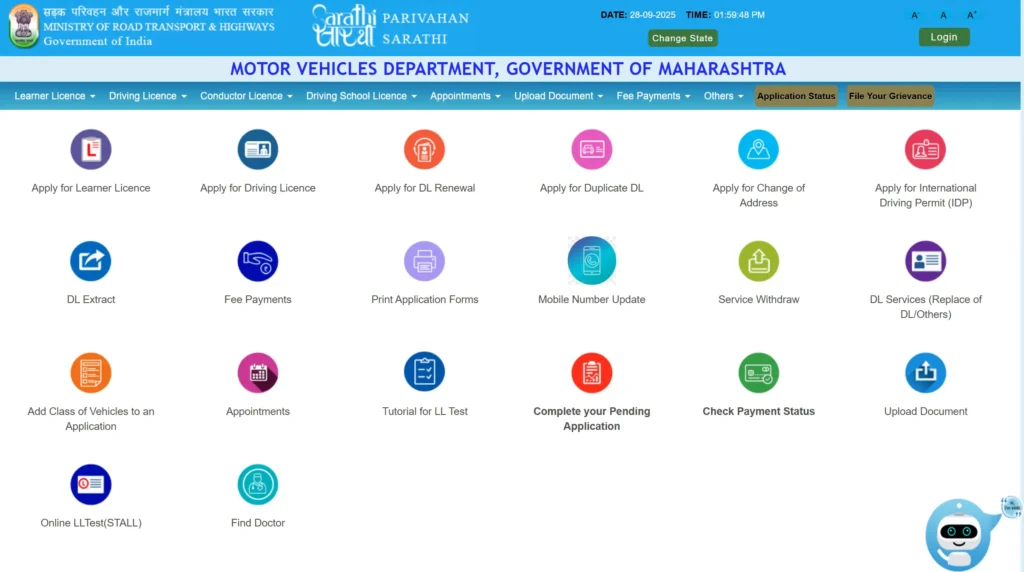
The Parivahan Sewa Portal (sarathi.parivahan.gov.in) is your digital hub for all driving license-related services. It works like a virtual RTO and it save your time and effort. Simply select your state to explore all the available services.
Apply
- Learner’s License (LL)
- Permanent Driving License (DL)
Update and Renew
- Renew DL
- Duplicate DL
- Change Address / Info
- Add Vehicle Class
Other Services
- International Driving Permit (IDP)
- DL Extract / Replacement
Check Eligibility for Learner’s and Permanent Driving License
1. Learner’s License (LL) – Practice Permit
- Purpose:
- Like “training wheels” – allows you to practice driving but only when accompanied by someone with a valid permanent Driving License (DL).
- Validity:
- Valid for 6 months (in some cases, can be extended).
- Eligibility:
- Age Requirements:
- 16 years → Motorcycle without gear (up to 50cc) with parental consent.
- 18 years → Motorcycle with gear and Light Motor Vehicle (LMV).
- 20 years → Commercial vehicle.
- Knowledge Requirement:
- Basic understanding of traffic rules and road signs.
- Age Requirements:
2. Permanent Driving License (DL) – Freedom Pass
- Purpose:
- The real license that lets you drive independently.
- Eligibility Conditions:
- Must hold a valid Learner’s License (LL) for at least 30 days and not more than 180 days.
- Must be proficient in driving the vehicle category applied for.
- Must pass the driving skill test.
- For commercial DL or applicants above 40 years, a medical certificate (Form 1A) is required.
- Should not be disqualified from driving.
LL vs DL Key Differences
| Feature | Learner’s License (LL) | Permanent Driving License (DL) |
|---|---|---|
| Purpose | Practice driving (with supervision) | Independent driving |
| Validity | 6 months | Long-term (renewable as per rules) |
| Age Criteria | 16 yrs (50cc, no gear), 18 yrs (LMV), 20 yrs (Commercial) | After holding LL for 30–180 days |
| Knowledge/Test | Basic traffic rules & signs | Driving skill test |
| Medical Requirement | Not needed generally | Needed for commercial/40+ applicants |
| Driving Freedom | With a supervisor (DL holder) | Drive freely on your own |
Documents Required for Driving License
1. Proof of Identity
- Aadhaar Card
- Passport
- Voter ID
- PAN Card
2. Proof of Address
- Aadhaar Card / Passport / Voter ID
- Utility Bill (electricity, water, gas – not older than 3 months)
- Rent Agreement (if applicable)
3. Proof of Age
- Birth Certificate
- 10th Grade Mark Sheet / School Leaving Certificate
- Passport
- Aadhaar Card
4. Passport-Sized Photos
- Recent passport-sized photographs (as per RTO specifications)
5. Additional Documents
- Learner’s License (for applying permanent DL)
- Application Forms:
- Form 1 – Self-declaration of physical fitness
- Form 1A – Medical Certificate (Required for commercial vehicles or applicants over 40 years old
- Form 2 – Learner’s License application
- Form 4 – Permanent Driving License application
- Application fee receipt
- NOC (No Objection Certificate) if applying in another state
- Driver Refresher Training Certificate (for heavy motor vehicles)
Steps to Apply for a Driving License
1. Go to the Parivahan Sewa portal:
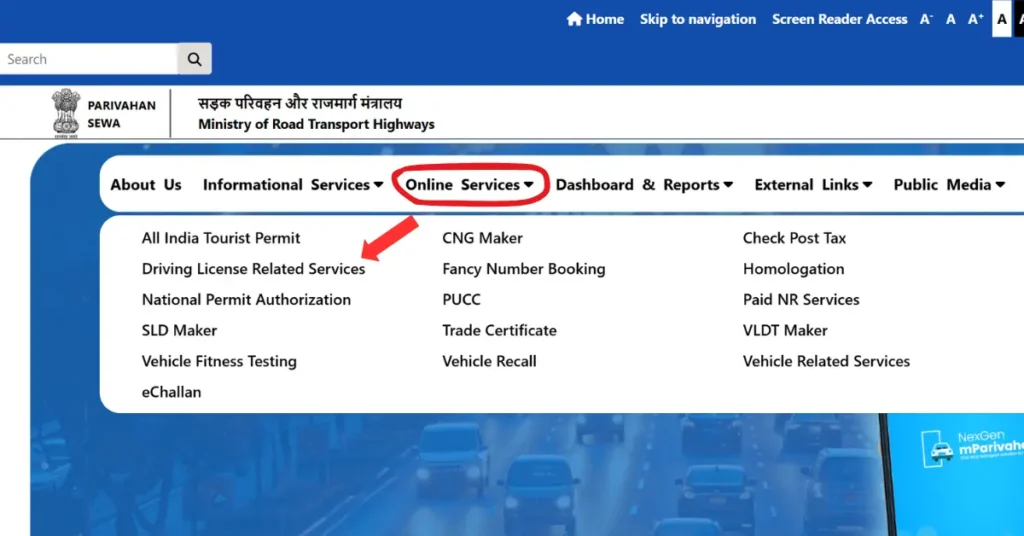
- Visit sarathi.parivahan.gov.in.
- Choose your state.
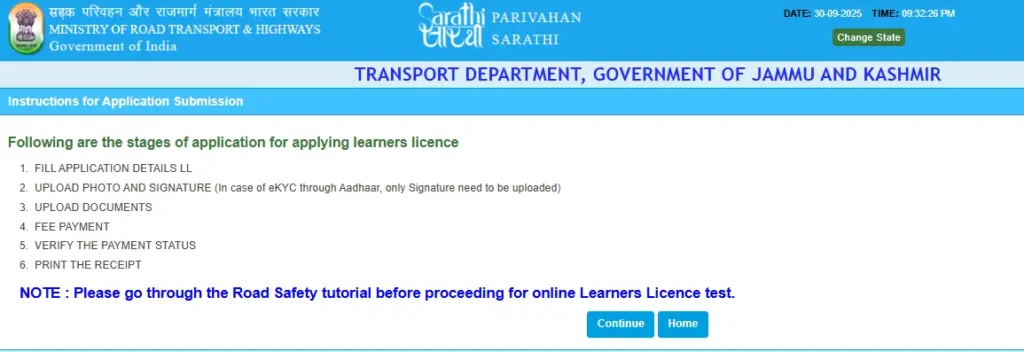
2. Apply Online for Learner’s Licence:
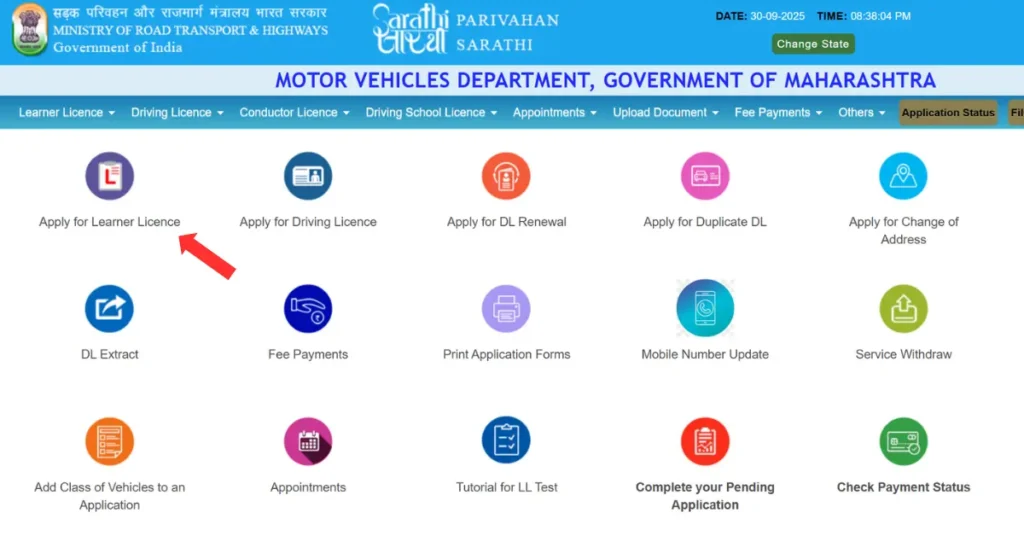
- Go to the “Learner’s Licence” section and start your application.
- Fill in the online form with your personal details.
- Upload the necessary documents.
- Pay the required application fee.
- Take the online learner’s test (if applicable).
3. Learner’s Licence Test
- Pass an online or offline test to get your learner’s licence.
4. Practice Driving
- Use your learner’s licence to practice driving under supervision.
5. Apply for Permanent Driving Licence
- After the waiting period (varies by state), apply online for a permanent licence.
- Fill the form and book your driving test slot.
6. Driving Test
- Appear for a practical driving test at the RTO.
7. Get Your Driving Licence
- Once you pass, your permanent driving licence will be issued.
Driving Licence Fees in India
| Service Type | Updated Fee (₹) | Description |
|---|---|---|
| Learner’s Licence (LL) | ₹150 | Issued for each class of vehicle. |
| Learner’s Licence Test or Re-Test Fee | ₹50 | Applicable for initial or repeat learner’s test. |
| Driving Licence Test Fee | ₹300 | Test of competence to drive (for each class of vehicle). |
| Permanent Driving Licence (DL) | ₹200 | Issued after passing the driving test. |
| Renewal of Driving Licence | ₹200 | Renewal of DL within the valid period. |
| Late Renewal of Driving Licence (after grace period) | ₹300 + applicable fees | Applicable for renewals after expiry. |
| Duplicate Driving Licence | ₹250–₹200 | Issued in case of loss or damage of DL. |
| International Driving Permit (IDP) | ₹1,000 | Permit to drive vehicles abroad. |
| Adding Another Vehicle Class to DL | ₹500 | For including an additional class of vehicle. |
| Endorsement/Renewal for Hazardous Goods Vehicle | ₹100 | For drivers carrying hazardous materials. |
| Driving School Licence – Issue or Renewal | ₹10,000 | For opening or renewing a motor driving school. |
| Duplicate Driving School Licence | ₹5,000 | For reissue of a lost or damaged driving school licence. |
| Appeal Against Licensing Authority Orders | ₹500 | Applicable for appeal submissions. |
| Change of Address or Particulars in DL | ₹200 | For updating address or other details in DL. |
| Conductor Licence Fee | 50% of DL fee | For issuing or renewing conductor licence. |
| Smart Card Driving Licence (Additional Fee) | ₹200 | For smart card format DL. |
Step-by-Step Process to Check Driving Licence Status
Step 1: Visit the Official Parivahan Sewa Website
- Go to parivahan.gov.in.
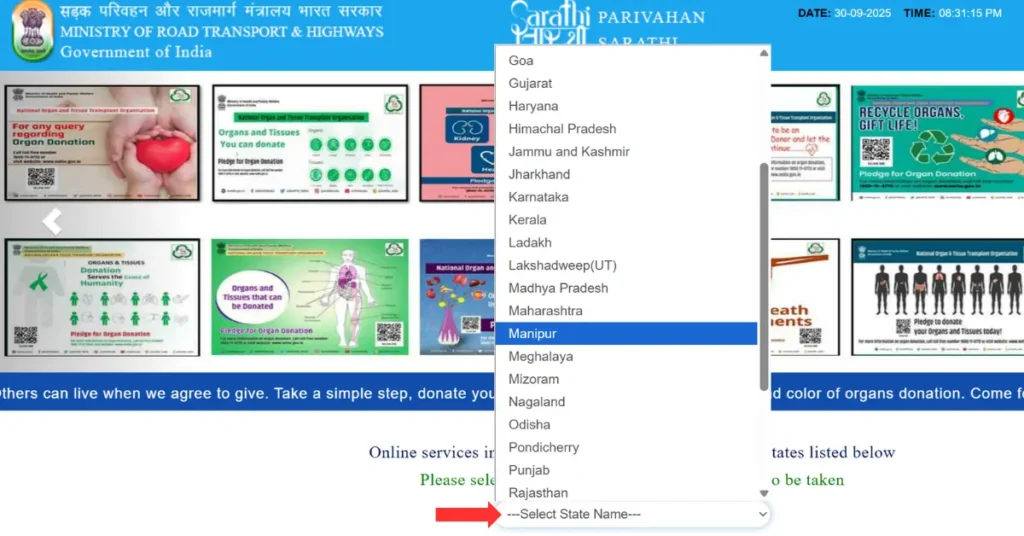
- From the homepage, navigate to “Online Services” → “Driving Licence Related Services.”
Step 2: Choose Your State
- Once the portal opens, a list of Indian states will appear.
- Select the state where you applied for your Driving Licence.
Step 3: Click on “Application Status”
- On the next page, click the “Application Status” option to proceed to the DL status tracking page.
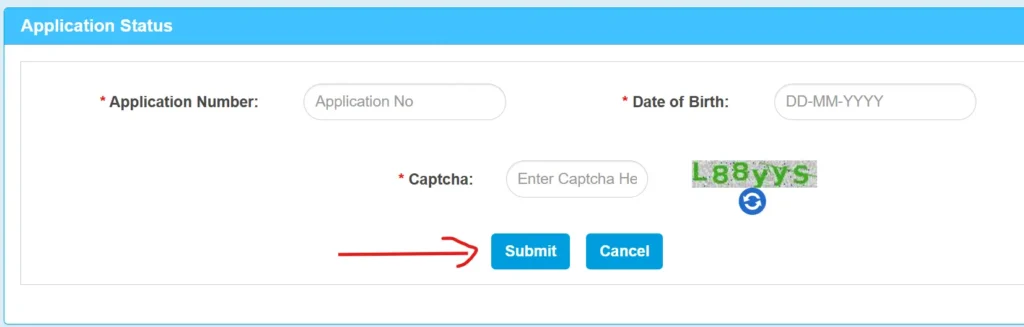
Step 4: Enter Required Details
Fill in the following details carefully:
- Application Number (as provided during your DL application)
- Date of Birth (in DD-MM-YYYY format)
- Captcha Code (shown on the screen)
Step 5: Submit and Check Your DL Status
- Click the “Submit” button.
- You’ll now see your Driving Licence Application Status — whether it’s under processing, approved, printed, or dispatched.
Renewal of Driving License
Renewing your driving license in India is now quick and simple through the official Parivahan Sewa Portal. Whether your DL is about to expire or has already expired recently, you can easily complete the renewal process online without visiting the RTO (in most cases).
Eligibility Criteria
- You can renew your driving license up to one month before its expiry date.
- If your license has expired within the last 5 years, you’re still eligible for renewal.
- If it has been expired for more than 5 years, you’ll need to apply for a fresh driving license.
Grace Period
- After your DL expires, you get a 30-day grace period to renew it without any penalty.
- If you apply after 30 days, a small late renewal fee will be charged, and the new validity starts from the application date.
Documents Required for DL Renewal
Make sure to keep the following documents ready before applying online:
- Original Driving License
- Form 9 – Application for Renewal of Driving License
- Form 1 (Self-declaration of physical fitness) for non-transport vehicles
or Form 1A (Medical Certificate) for applicants over 40 years or holding commercial DLs - Proof of Age and Address (Self-attested copies)
- Recent Passport-sized Photographs
- Renewal Fees Payment Receipt
How to Renew Driving License Online – Complete Process
Follow these simple steps to renew your DL through Parivahan Sewa:
Step 1: Visit the Parivahan Sewa Portal
- Go to parivahan.gov.in
- Navigate to “Online Services” → “Driving Licence Related Services”.
Step 2: Select Your State
- Choose the state where your driving license was originally issued.
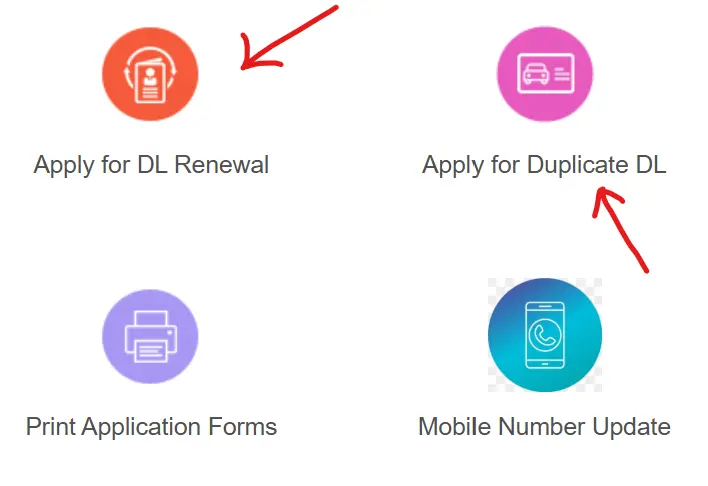
Step 3: Choose “Apply for DL Renewal”
- Click on the “Apply for DL Renewal” option from the dashboard.
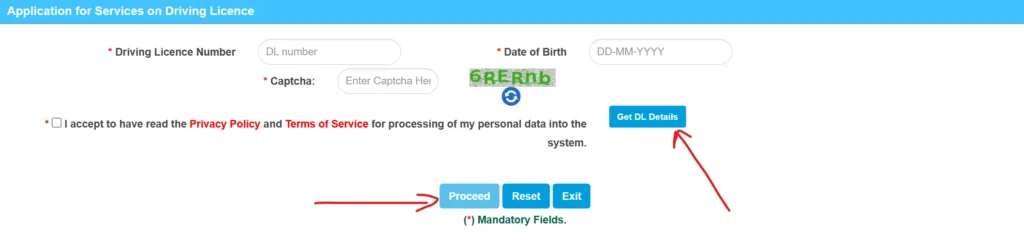
Step 4: Enter DL Details
- Provide your Driving License Number, Date of Birth, and the Captcha Code.
- Then click on “Get DL Details” to fetch your license information.
Step 5: Fill and Upload Documents
- Fill in Form 9 and upload scanned copies of all required documents like Form 1/1A, address proof, and photos.
Step 6: Pay Renewal Fee
- Complete the online payment for your DL renewal.
Step 7: Schedule RTO Appointment (If Required)
- Some states may ask you to visit the RTO for document verification or a re-test, especially if your DL has been expired for a long time.
Step 8: Receive Your Renewed DL
- Once processed and verified, your renewed Driving License will be dispatched to your registered address by post.
Key Tips for Successful DL Renewal
- Start your renewal process at least 30 days before expiry.
- Always upload clear and valid documents.
- Keep a soft copy of your acknowledgment and payment receipt.
- You can track your DL renewal status anytime on the Parivahan Sewa portal.
Driving License Download
Did you know you can easily download your driving license online without visiting the RTO?
Whether you need a PDF copy for printing or a digital DL for your phone, this step-by-step guide will help you download your Driving License (DL) via Parivahan Sewa or DigiLocker/mParivahan App.
1. Download Driving License via Parivahan Sewa Portal (Printable Copy)
If you want to print your driving license online, the Parivahan Sewa Portal allows you to download a PDF version in just a few minutes.
Step 1: Visit Parivahan Sewa Portal
- Go to parivahan.gov.in → Click on “Online Services” → Select “Driving Licence Related Services.”
Step 2: Choose Your State
- Pick the state where your driving license was issued.
Step 3: Select “Print Driving Licence”
- Under the Driving Licence menu, click on “Print Driving Licence.”
Step 4: Enter Required Details
- Fill in your Application Number or Driving License Number, Date of Birth, and Captcha Code.
Step 5: Submit and Download PDF
- Your driving license details will appear.
- Click on “Print” to download your DL as a PDF file — ready to print and use as an official copy.
2. Download Driving License via DigiLocker or mParivahan App (Digital Copy)
For a digital version of your DL that’s legally valid across India, use DigiLocker or the mParivahan app. Both are government-approved and accepted as valid digital ID proofs.
Step 1: Install the App
- Download the DigiLocker or mParivahan app from Google Play Store or Apple App Store.
Step 2: Sign In or Create an Account
- Use your Aadhaar number or registered mobile number to log in or sign up.
Step 3: Link Your Driving License
- Enter your DL number and verify details to link your driving license with your account.
Step 4: Access Your Digital DL
- Your digital driving license will appear in the “Issued Documents” section of the app.
- This version is legally valid and can be shown to traffic authorities whenever required.
Why Download Your Driving License Online?
- Get an instant copy of your DL anytime, anywhere
- Avoid loss or damage to the physical card
- Legally valid under the Motor Vehicles Act
- Accepted across India during traffic checks and verification
Duplicate Driving License on Parivahan Sewa
Losing or damaging your driving license can be stressful—but replacing it doesn’t have to be. Whether your DL is lost, stolen, or damaged, you can easily apply for a duplicate driving license online through the Parivahan Sewa Portal.
When You Need a Duplicate Driving License?
You should apply for a duplicate DL if:
- Lost or Stolen: Your original license has been misplaced or stolen.
- Damaged or Unreadable: The card is torn, faded, or otherwise unusable.
- Photo or Information Update: You need a new photograph or updated details.
Eligibility Criteria
To apply for a duplicate driving license, your original DL must still be valid. Expired licenses must first be renewed before applying for a duplicate.
Documents Required for Duplicate Driving License
Before applying, make sure you have the following:
- Application Form LLD – for reporting loss, theft, or destruction.
- FIR Copy – required if the DL is lost or stolen.
- Original License – if it’s damaged or mutilated.
- Attested Photocopies – of the lost license, if available.
- Passport-Sized Photographs.
- Proof of Address and Age – such as Aadhaar card, passport, or voter ID.
- Challan Clearance Report – for commercial vehicle license holders.
- Prescribed Fee – applicable user charges for the duplicate DL.
Online Application Process for Duplicate DL
Follow these simple steps to apply for your duplicate driving license through Parivahan Sewa:
Step 1: Visit the Parivahan Sewa Portal
- Go to the official website — Parivahan Sewa.
- Click on “Online Services” → “Driving Licence Related Services.”
Step 2: Select Your State
- Choose the state where your original driving license was issued.
Step 3: Apply for Duplicate DL
- Click on “Apply for Duplicate DL” and follow the on-screen instructions.
Step 4: Enter Your Details
- Provide your Driving License Number, Date of Birth, and Captcha Code, then click “Get DL Details.”
Step 5: Upload Required Documents
- Upload scanned copies of all necessary documents, including the FIR (if applicable) and Form LLD.
Step 6: Pay the Prescribed Fee
Complete the payment online through the available payment gateway.
Step 7: Submit & Print Receipt
- After successful submission, print your acknowledgment receipt and application reference number.
Step 8: Track Application Status
- You can track your duplicate DL application status on the portal using your application number.
Step 9: Receive Your Duplicate Driving License
- Once approved, the duplicate DL will be dispatched to your registered address by post.
Driving License Forms
| Form Number | Description |
|---|---|
| Form 1 | Self-declaration of physical fitness for non-transport vehicles. |
| Form 1A | Medical Certificate for transport vehicles. |
| Form 2 | Application for the grant or renewal of a driving license. |
| Form 3 | Learner’s License application form. |
| Form 4A | Application for the grant of a driving license. |
| Form 5 | Driving Certificate issued by a driving school or establishment. |
| Form 8 | Application for adding a new class of vehicle to a driving license. |
| Form 9 | Application for renewal of a driving license. |
Vehicle-Related Forms
| Form Number | Description |
|---|---|
| Form 20 | Application for Registration of a New Vehicle |
| Form 21 | Vehicle Sale Certificate (Issued by Dealer) |
| Form 22 | Certificate of Roadworthiness (Issued by Manufacturer) |
| Form 25 | Application for Renewal of Vehicle Registration Certificate (RC) |
| Form 26 | Form for Duplicate RC (Lost or Damaged) |
| Form 27 | Application for Allotment of New Registration Mark (Inter-State Vehicle Transfer) |
| Form 28 | Application for Issue of No Objection Certificate (NOC) for Vehicle Transfer |
| Form 29 | Notice of Transfer of Vehicle Ownership (To Be Submitted by Seller) |
| Form 30 | Vehicle Ownership Transfer Application (for Buyer) |
| Form 31 | Ownership Transfer After Owner’s Death |
| Form 32 | Vehicle Ownership Transfer for Public Auction Purchases |
| Form 33 | Notification of Address Change in Vehicle Registration Certificate (RC) |
| Form 34 | Recording of Hire-Purchase, Lease, or Hypothecation Agreement in Vehicle RC |
| Form 35 | Termination of Hire-Purchase, Lease, or Hypothecation Agreement (After Loan Closure) |
Parivahan Sewa: Vehicle Services & e-Challan Payment
The Parivahan Sewa Portal by the Ministry of Road Transport & Highways, Government of India, provides a one-stop solution for all vehicle-related services — from license management to eChallan payments. Whether you need to check your vehicle details or pay a traffic fine. Here’s the step-by-step guide:
What is Parivahan Sewa?
Parivahan Sewa (parivahan.gov.in) is India’s official online platform for transport-related services. It allows citizens to manage vehicle registration, apply for driving licenses, check challans, and pay fines — all in one place.
Accessing Vehicle-Related Services (Vahan)
Follow these steps to access vehicle-related services online through the Parivahan Sewa portal:
Step 1: Visit the Official Website
- Go to https://parivahan.gov.in
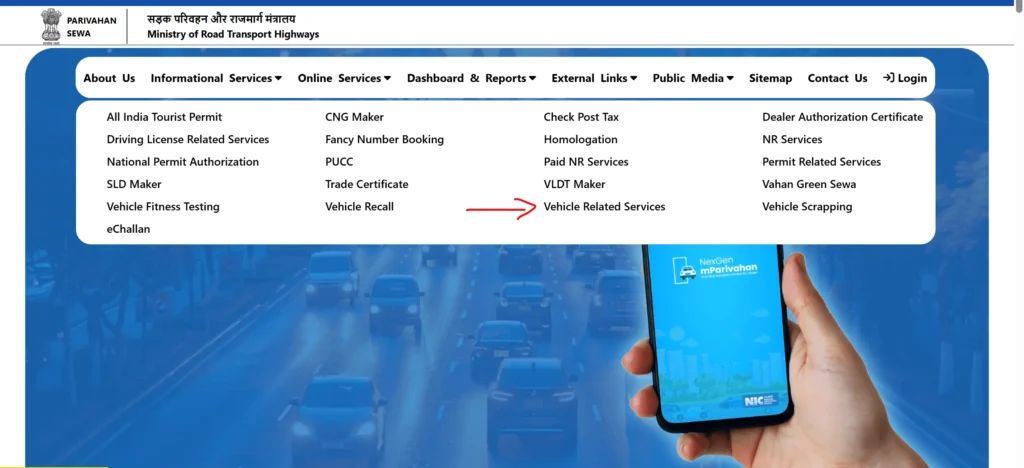
Step 2: Open Online Services
From the homepage, click “Online Services” → “Vehicle Related Services.”
Step 3: Select Your State
- Choose your state from the drop-down list to open the regional Vahan portal.
Step 4: Access Citizen Services
- This will open the Vahan Citizen Services page, where you can access multiple options such as registration details, vehicle tax, and ownership transfer.
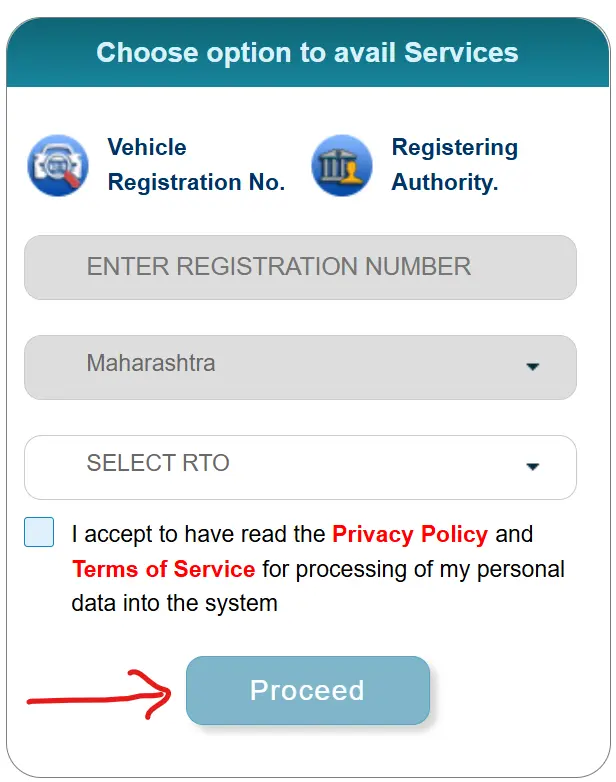
Step 5: Enter Vehicle Details
- Provide your Vehicle Registration Number, RTO Name, and State.
Step 6: Proceed
- Click “Proceed” to access all available vehicle services for your region.
How to Check and Pay eChallan Online
Follow these steps to verify and settle your eChallan:
Step 1: Visit the eChallan Portal
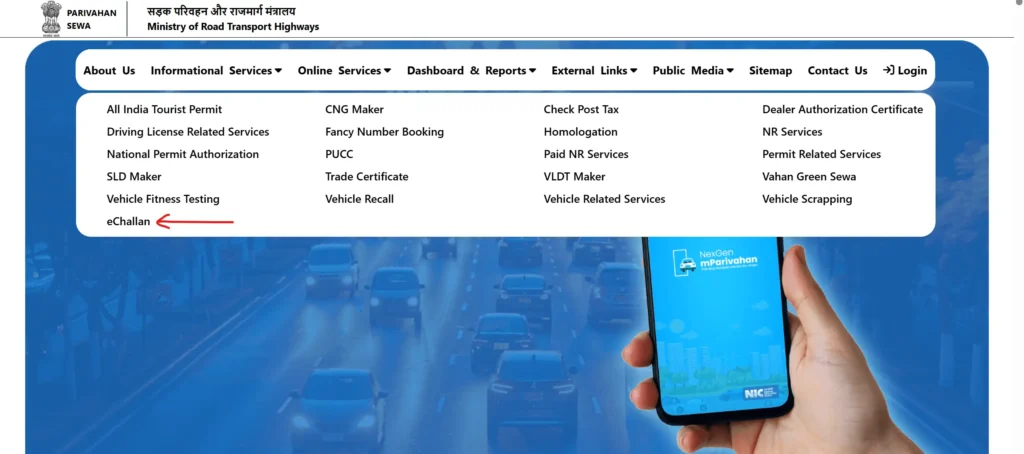
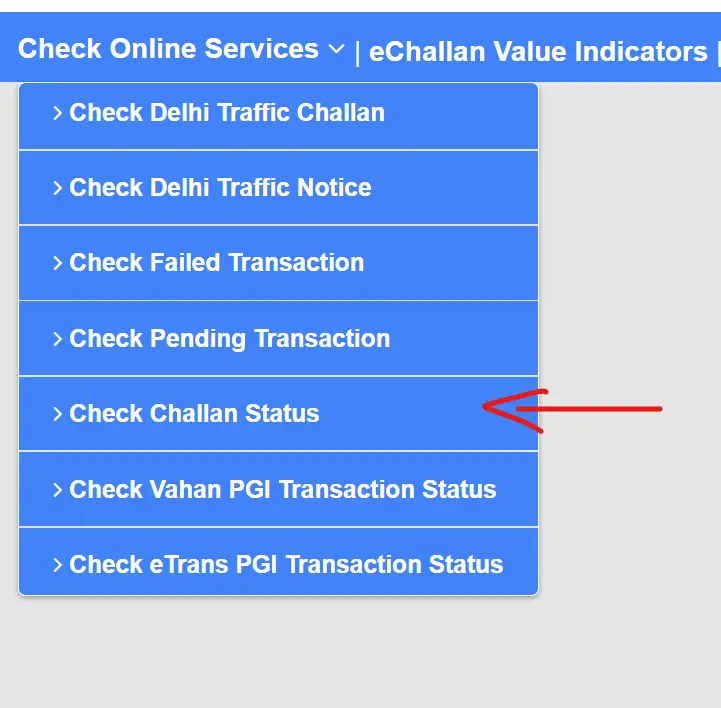
Step 2: Select “Check Challan Status”
- Click “Online Services” → “eChallan” on the Parivahan menu.
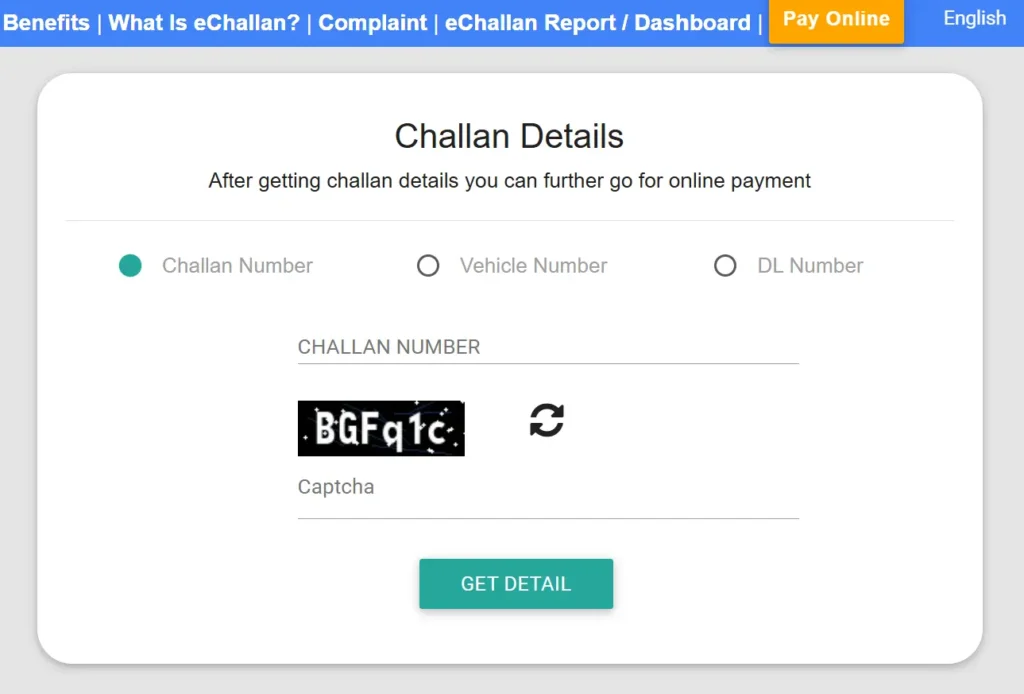
Step 3: Choose How to Search
You can check challan details using any of these:
- Challan Number
- Vehicle Number (with Chassis or Engine No.)
- Driving License (DL) Number
Step 4: Enter Captcha
- Fill in the security code displayed on the screen.
Step 5: Click “Get Details”
Your challan details will appear, including:
- Type of violation
- Fine amount
- Date and location of incident
- Payment status
How to Pay eChallan Online (Step-by-Step)
Once your challan details are displayed, follow these steps to make the payment online:
Step 1: Select the Challan for Payment
- Choose the pending challan(s) you wish to pay.
Step 2: Click “Pay Now”
- Hit the “Pay Now” button to proceed to payment.
Step 3: Choose Payment Mode
Select your preferred method:
- Net Banking
- Debit Card / Credit Card
- UPI
Step 4: Complete the Payment
- Follow the on-screen instructions to finalize your transaction.
Step 5: Save or Print Receipt
- Once payment is successful, a transaction ID and receipt will be generated.
- You can download or print it for future reference. You may also receive an SMS confirmation.
Additional Tips
- Always verify the challan details before making payment.
- Keep your vehicle registration and DL number handy.
- Download and save your payment receipt for record purposes.
- Use only the official Parivahan website to avoid fraud.
Parivahan Helpline & Contact Information (Official)
General Contact Details:
| Category | Contact Information |
|---|---|
| Vehicle Issues | Email: helpdesk-vahan@gov.in |
| Driving License Issues | Email: helpdesk-sarathi@gov.in |
| General Inquiries | Call: +91-120-4925505 |
| mParivahan App Issues | Email: helpdesk-mparivahan@gov.in |
| Traffic Fine (eChallan) Issues | Email: helpdesk-echallan@gov.in |
| Website Feedback | Email: wim.rth@nic.in |
Helpline Support by Service Type:
| Problem Area | Official Email ID |
|---|---|
| Vehicle Registration, Fitness, Tax, Permit, Dealer Services | helpdesk-vahan@gov.in |
| Learner’s License & Driving License Services | helpdesk-sarathi@gov.in |
| mParivahan Mobile App Services | helpdesk-mparivahan@gov.in |
| eChallan (Traffic Fine) Services | helpdesk-echallan@gov.in |
FAQs
1. What is Parivahan Sewa?
Parivahan Sewa is a indian government-operated digital platform that provides online services related to vehicle registration, driving licenses, tax payments, fitness certificates, permits, and challan management. It aims to make RTO processes transparent, convenient, and accessible to citizens.
2. How can I apply for a Learner’s License (LL) or Driving License (DL) online?
You can apply for both Learner’s and Driving Licenses online through the official Sarathi Parivahan Portal. After visiting the website, you need to select your state, choose whether you want to apply for a Learner’s or Driving License, fill in the application form, upload the required documents, make the payment, and book a slot for your test. This online process simplifies the traditional RTO procedure.
3. How do I check my Driving License or Vehicle Registration status online?
To check the status of your driving license or vehicle registration, visit Parivahan.gov.in. From the homepage of Parivahan, go to either “Driving License Related Services” or “Vehicle Related Services.” Enter your application number or vehicle registration number to view your current status and related details.
4. How can I check and pay my e-Challan online?
You can easily check and pay your Challan (traffic fines) using the eChallan Parivahan Portal. Simply enter your challan number, vehicle number, or driving license number to view pending challans. Once verified, you can complete the payment securely through the available online payment options like UPI, Net banking, credit/debit cards etc.
5. Can I renew my Driving License through Parivahan Sewa?
Yes, the Parivahan sewa portal allows you to renew your driving license online. Visit Parivahan.gov.in, select “Driving License Related Services” choose “Apply for DL Renewal” and complete the online process by filling in the remaining required details, uploading necessary documents, and paying the renewal fee. If necessary, you will be required to visit your RTO for biometric verification.
6. What documents are required for a Driving License application?
To apply for a driving license, you need to provide proof of age (such as a birth certificate or Aadhaar card), proof of address (like Aadhaar, passport, or utility bill), and Form 1 or Form 1A (For Medical/physical fitness). You will also need to upload your recent passport-size photographs as part of the online submission.
7. How can I transfer vehicle ownership online?
You can transfer the ownership of your vehicle through the Parivahan Sewa Portal. Visit the site and select “Vehicle Related Services” then enter your vehicle registration number and choose the transfer of ownership option. Upload the necessary documents, pay the applicable fee, and submit the application online. The status of your ownership transfer can also be tracked through the same portal.
8. Is it compulsory to visit the RTO after applying for a Driving License online?
If you want a permanent driving-license, you must visit the RTO to complete your driving test. However, for services like obtaining a Learner’s License in some states, the entire driving license process can be completed in online mode, including the test. The requirement for an RTO visit is completely depends on the type of license and the state’s rules & regulations.
9. Can I download a digital copy of my Driving License?
Yes, you can download and use a digital copy of your driving license via the Parivahan Sewa portal by selecting the “Print Driving License” option under “Driving License Related Services.” You can also access your digital driving license through the mParivahan app or DigiLocker, both of which are officially recognized by the government as valid digital platforms.
10. What is the validity of a Learner’s License?
A Learner’s License (LL) is valid for six months from the date of issue. You must apply for a permanent driving license within 30 to 180 days after getting your learner’s license to avoid expiration or reapplication.
11. What should I do if I lose my Driving License?
If your driving license is lost, stolen, or damaged, you can apply for a duplicate license through the Parivahan Sewa Portal. Choose the “Apply for Duplicate DL” option, fill in the required details, and upload necessary documents such as an FIR copy (in case of theft), ID proof, and recent photographs. Once the application is approved, the duplicate license will be issued by your RTO.